
PRO version only
Availability settings are located in Easy Scheduling > Settings > Availability
These settings control how appointment availability is managed.
Appointment duration
Define the duration of appointments in minutes
The appointment duration determines how long a reservation blocks availability.
Example
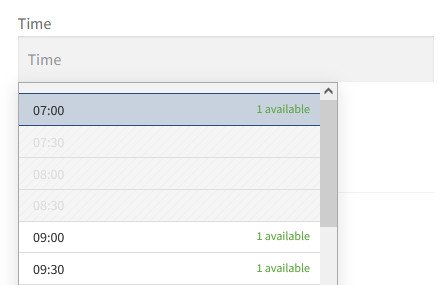
- Interval:
30 - Appointment duration:
60
An appointment booked at 08:00 will block availability until from 07:00 to 09:00.
Nearby appointment times may also become unavailable automatically.
Buffer time
Add extra time before and after appointments in minutes
Buffer time helps prevent appointments from being scheduled too close to each other.
Example
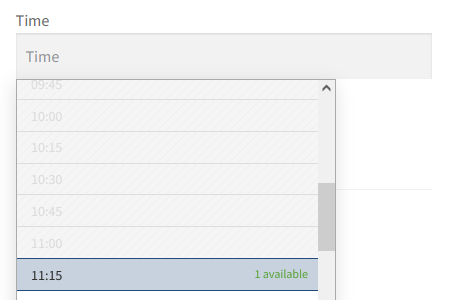
- Interval:
15 - Appointment duration:
60 - Buffer time:
15
An appointment booked at 10:00 will reserve the time range from 08:45 to 11:15.
Nearby appointment times may also become unavailable automatically.
Important
Incorrect combinations may prevent appointment times from displaying correctly or create unexpected availability behavior.
Make sure your appointment duration and buffer time settings are consistent with the selected interval value.
Show end time
Enable this option to display the end time alongside the start time of each time slot in the time picker, cart, checkout and orders. For example, a 55-minute appointment starting at 10:00 will appear as 10:00 – 10:55.
The end time is calculated automatically based on the appointment duration.
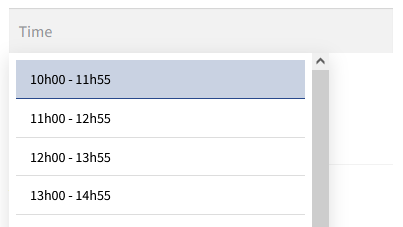
- Interval:
60 - Appointment duration:
115 - Buffer time:
5