
PRO version only
Share availability between all products
Availability settings are located in Easy Scheduling > Settings > Availability
Enable this option to share appointment availability across all appointment products.
When enabled, all products use the same availability pool. Booking an appointment for one product automatically reduces the availability of every other product for the same date and time.
This is useful when multiple services rely on the same shared resource, such as:
- a single employee
- a room
- a vehicle
- a piece of equipment
Example
A beauty salon offers:
- Haircut
- Hair coloring
- Beard trim
Since all services are performed by the same stylist, only one appointment can be booked at a time.
Note
This setting applies to all appointment products on your website. If you only need to share availability between specific products, use Availability groups instead.
Availability groups
Availability groups allow you to share appointment availability between selected products instead of the entire catalog.
Products assigned to the same availability group share the same availability. Booking an appointment for one product automatically reduces the availability of all other products in the same group.
This is useful when several services share the same resource without affecting the availability of unrelated products.
Create an Availability Group
Availability groups are managed in: Easy Scheduling > Availability Groups
To create a new group:
- Click Add group
- Enter a group name
- Save changes
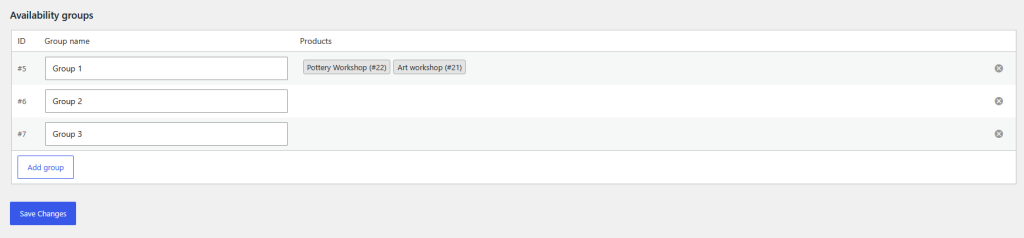
The group name is only used for identification in the WordPress admin area. Once products are assigned to the group, they will appear in the Products column.
Assign a Product to a Group
After creating a group, you can assign it to one or more appointment products in Products > Edit Product > Product data > Appointments
Select the desired group using the Availability group field.
Products assigned to the same group automatically share their availability.
Note
Each product or variation can belong to only one availability group.
Example
A wellness center offers the following services:
- Massage
- Facial treatment
- Body scrub
The Massage and Facial treatment services are performed in the same treatment room, while Body scrub uses a different room.
By assigning Massage and Facial treatment to the same availability group, a booking for either service automatically reduces the availability of the other, while Body scrub remains unaffected.