
Location: Settings > General
Site language
The appointment date and time picker automatically uses your WordPress site language when available.

If a translation is available for your language, the calendar will automatically display localized:
- Day names
- Month names
- “Today”, “Clear” and “Close” buttons
Date and time format
You can also customize how dates and times are displayed across the plugin.
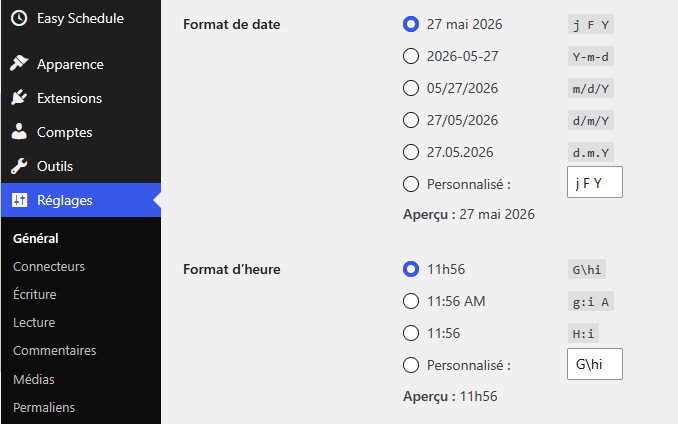
- Date format: controls how dates are displayed
- Time format: controls how times are displayed
These settings allow you to match the plugin display with your local or business formatting style.
Week starts on
You can define which day starts the calendar week in:
Available options:
- Monday
- Sunday
This affects how the calendar grid is displayed to customers.
Custom picker translations
If your language is not fully translated, you can customize the picker translations manually.
- In -wp-content/plugins/easy-schedule/assets/libs/pickadate/translations/
- Find the file corresponding to your website language (for example fr_FR.js for French)
- Add the missing translation.
This is an example of a complete file for fr_FR (French) language:
jQuery.extend( jQuery.fn.pickadate.defaults,{
        monthsFull:["Janvier","Février","Mars","Avril","Mai","Juin","Juillet","Août","Septembre","Octobre","Novembre","Décembre"],
    monthsShort:["Jan","Fev","Mar","Avr","Mai","Juin","Juil","Aou","Sep","Oct","Nov","Dec"],
    weekdaysFull:["Dimanche","Lundi","Mardi","Mercredi","Jeudi","Vendredi","Samedi"],
    weekdaysShort:["Dim","Lun","Mar","Mer","Jeu","Ven","Sam"],
    today:"Aujourd'hui",
    clear:"Effacer",
    close:"Fermer",
    firstDay:1,
    format:"dd mmmm yyyy",
    formatSubmit:"yyyy/mm/dd",
    labelMonthNext:"Mois suivant",
    labelMonthPrev:"Mois précédent",
    labelMonthSelect:"Sélectionner un mois",
    labelYearSelect:"Sélectionner une année"
}),
jQuery.extend(jQuery.fn.pickatime.defaults,{
    clear:"Effacer"
});